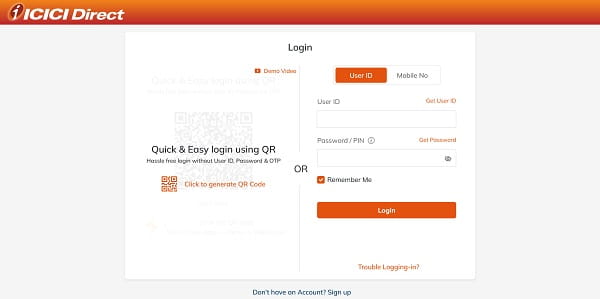
Even with a well-maintained platform, ICICI Direct users encounter login difficulties at various points — forgotten passwords, undelivered OTPs, outdated registered mobile numbers, locked accounts after repeated failed attempts, and app-specific glitches. This article addresses every significant login issue systematically, with the precise resolution pathway for each.

Issue 1: Forgotten Password
Problem: You cannot recall the password you set, or you are logging in after a long gap and the password is no longer accessible.
Solution: On the ICICI Direct login page (icicidirect.com), click “Forgot Password.” Enter your User ID. The system will prompt you to enter your PAN card number and date of birth for identity verification. An OTP is dispatched to your registered mobile number and email. Verify the OTP, and you will be directed to the password reset screen where you can set a new password following ICICI Direct’s password policy. Confirmation of the reset is sent to your registered email.
Issue 2: Forgotten User ID
Problem: You do not remember your User ID (this happens frequently when accounts are old or login has not been attempted for an extended period).
Solution: On the ICICI Direct login page, click “Forgot User ID.” Enter your PAN card number and registered mobile number. An OTP is sent to the mobile number — verify it to retrieve your User ID. The User ID is displayed on-screen and also sent to your registered email.
Issue 3: OTP Not Received
Problem: The login OTP is not arriving on your registered mobile or email, preventing 2FA completion.
Causes and Solutions:
Mobile OTP not arriving: Check mobile signal strength. Ensure your registered mobile number is still active and not ported to a different SIM without ICICI Direct’s records being updated. Check if your SMS inbox is full. Wait up to 2 to 3 minutes — OTP delivery can be delayed during high-traffic periods.
Email OTP not arriving: Check your spam/junk folder. Ensure the email inbox is not full. Confirm the email address registered with ICICI Direct is still active.
Mobile number changed: If you have changed your mobile number after opening the account, the OTP goes to the old number. Contact ICICI Direct customer care at their helpline or visit a branch with identity proof to update your registered mobile number — this cannot be done self-service online for security reasons.
Issue 4: Account Locked After Multiple Failed Login Attempts
Problem: Entering incorrect passwords multiple times triggers an automatic account lock — a security measure to prevent brute-force attacks.
Solution: Do not attempt further logins once the lock message appears, as additional attempts can extend the lock period. Use the “Forgot Password” self-service flow to reset your password — this simultaneously unlocks the account. If the self-service reset does not work (due to unregistered mobile number or other identity mismatch), contact ICICI Direct customer care at their registered helpline or via email for manual account unlock with identity verification.
Issue 5: Password Accepted but OTP Screen Fails
Problem: The correct password is entered and accepted, but the OTP entry screen shows an error or freezes before OTP can be submitted.
Solutions: Clear your browser cache and cookies, then retry. Try a different browser (Chrome, Firefox, Edge, or Safari). Disable browser extensions like ad blockers that may interfere with the OTP input form. On mobile, ensure you are using the latest version of the ICICIDirect app. If the issue persists on the web, use the mobile app instead as an alternate login route.
Issue 6: Registered Mobile Number No Longer Active
Problem: The mobile number registered with ICICI Direct at the time of account opening has been deactivated or ported, and OTPs are no longer receivable.
Solution: This requires offline resolution. Visit the nearest ICICI Bank branch or ICICI Securities office with identity proof (PAN card and Aadhaar). Submit a mobile number update request form with the new mobile number. Carry original documents for in-person verification. Once the update is processed (typically 2 to 5 business days), OTPs will be delivered to the new number, restoring login capability.
Issue 7: App Quick PIN Not Working
Problem: The Quick PIN set on the mobile app is no longer accepted, or the app prompts full credential entry every time.
Solutions: If the app was recently reinstalled or the phone data was cleared, the Quick PIN association is reset — you need to perform a full credential login (User ID + password + OTP) to re-establish the session, then set a new Quick PIN in Settings. App updates can also occasionally reset security preferences. Ensure the ICICIDirect app is on the latest version from the Play Store or App Store.
Overview: Common ICICI Direct Login Issues and Quick Fixes
| Login Issue | Cause | Solution |
| Forgotten Password | Not remembered | Use Forgot Password → PAN + DOB + OTP → Reset |
| Forgotten User ID | Not remembered | Use Forgot User ID → PAN + mobile OTP |
| OTP Not Received (Mobile) | Network/number issue | Check signal, inbox; contact support if number changed |
| OTP Not Received (Email) | Spam/inbox full | Check spam folder; verify email is active |
| Account Locked | Multiple failed attempts | Use Forgot Password to reset and unlock |
| OTP Screen Freeze | Browser/app issue | Clear cache, try different browser, update app |
| Registered Mobile Inactive | Old/ported number | Visit branch with ID proof to update number |
| Quick PIN Not Working | App reinstall/update | Full credential login, re-set Quick PIN |
Frequently Asked Questions (FAQs)
Q1. What should I do if I receive no OTP on my ICICI Direct registered number?
A: First check mobile signal and SMS inbox. If the number has changed, contact ICICI Direct customer care or visit a branch with identity proof to update your registered mobile — OTP delivery to the old number cannot be redirected remotely.
Q2. How do I retrieve my forgotten ICICI Direct User ID?
A: Visit icicidirect.com, click “Forgot User ID,” enter your PAN and registered mobile number, verify OTP, and your User ID is displayed and sent to your email.
Q3. Is there a way to log in to ICICI Direct without OTP?
A: No — OTP is mandatory for every web login session under SEBI’s 2FA requirement since September 2022. The mobile app Quick PIN provides convenience on a trusted device after initial full authentication but does not bypass OTP entirely.
Q4. What happens when an ICICI Direct account is locked?
A: The account temporarily disables login after multiple failed password attempts. Use the Forgot Password flow to reset your password — this simultaneously unlocks the account. Contact customer support if the self-service reset fails.
Q5. How do I update my mobile number for ICICI Direct login OTP?
A: Visit an ICICI Bank branch or ICICI Securities office with your PAN card and Aadhaar for identity verification. Submit the mobile number update form. The update is processed within 2 to 5 business days.