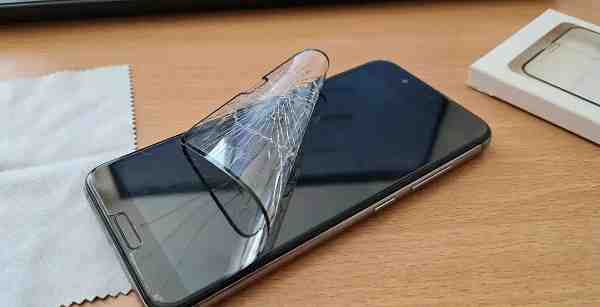
A screen protector is one of the simplest and most effective ways to protect your smartphone, tablet, or other touchscreen devices from scratches, cracks, and everyday wear and tear. However, after accidental drops or impacts, the screen protector itself may become cracked, chipped, or damaged. While a broken screen protector can look alarming, it often means the protector has done its job by absorbing the impact and protecting the actual screen underneath.
If you’re wondering how to fix a broken screen protector, this guide explains what you can and cannot repair, when to replace it, and how to safely remove and install a new one.
Can a Broken Screen Protector Be Repaired?
The short answer is no. Most modern screen protectors, especially tempered glass protectors, cannot be permanently repaired once they crack.
Unlike some minor screen scratches that can be hidden temporarily, cracks in a screen protector usually weaken its structure and reduce its ability to protect your device from future damage.
In most cases, replacing the damaged protector is the best and safest solution.
How to Check Whether the Screen Protector or Screen Is Broken
Before replacing the protector, determine whether the damage affects only the protector or the device’s actual display.
Signs the Screen Protector Is Broken
- Cracks appear only on the protector surface.
- The touchscreen functions normally.
- Display colors and brightness are unaffected.
- You can feel the crack above the screen layer.
Signs the Actual Screen Is Damaged
- Black spots or colored lines appear on the display.
- The touchscreen becomes unresponsive.
- The screen flickers.
- Cracks remain visible after removing the protector.
If the damage is limited to the protector, replacement is usually quick and inexpensive.
Temporary Solutions for Minor Damage
If you cannot replace the protector immediately, a few temporary measures may help.
Use Clear Tape
For small cracks, apply a thin layer of transparent tape over the damaged area.
Benefits include:
- Preventing loose glass fragments from falling off.
- Reducing the risk of finger cuts.
- Keeping the protector usable until replacement.
This is only a short-term solution and does not restore protection.
Avoid Additional Pressure
If the protector is cracked:
- Avoid pressing hard on the damaged area.
- Remove phone cases carefully.
- Keep the device away from situations that may worsen the crack.
Further impact can cause the protector to shatter more extensively.
How to Remove a Broken Screen Protector
Replacing a damaged protector starts with safe removal.
Step 1: Turn Off the Device
Power off your smartphone or tablet before beginning.
This helps prevent accidental inputs and makes cleaning easier.
Step 2: Lift One Corner
Use:
- A fingernail
- A plastic card
- A plastic opening tool
Carefully lift one corner of the protector.
Avoid using metal objects because they may scratch the screen.
Step 3: Slowly Peel Off the Protector
Once a corner is lifted:
- Pull gently.
- Peel slowly across the screen.
- Support cracked sections during removal.
Take extra care if the protector is severely shattered.
Step 4: Dispose of Broken Glass Safely
Place broken tempered glass in paper or protective wrapping before discarding it.
This reduces the risk of injury.
Clean the Screen Before Installing a New Protector
After removing the damaged protector:
- Use a microfiber cloth.
- Remove fingerprints and dust.
- Clean the screen with an alcohol wipe if available.
- Ensure no debris remains on the display.
A clean screen ensures proper adhesion of the replacement protector.
Installing a New Screen Protector
Step 1: Align the Protector
Position the new protector carefully above the screen.
Check:
- Camera cutouts
- Speaker openings
- Edge alignment
Proper positioning helps avoid installation errors.
Step 2: Apply the Protector
Once aligned:
- Remove the adhesive backing.
- Lower the protector slowly.
- Allow the adhesive layer to bond naturally.
Many modern protectors self-adhere once placed correctly.
Step 3: Remove Air Bubbles
Use a soft card or installation tool to push bubbles toward the edges.
Most small bubbles disappear automatically within a few hours.
Why Replacing Is Better Than Repairing
Many users search for ways to repair cracked screen protectors, but replacement offers several advantages:
Better Protection
A cracked protector no longer absorbs impacts effectively.
Improved Appearance
Replacing the protector restores a clean and professional look.
Better Touch Sensitivity
Damaged protectors can affect touchscreen responsiveness.
Enhanced Visibility
New protectors eliminate distracting cracks and scratches.
Considering the relatively low cost of most protectors, replacement is often the most practical option.
Tips to Prevent Future Damage
While screen protectors are designed to absorb impacts, proper care can extend their lifespan.
Use a Quality Phone Case
A protective case helps reduce impact during drops.
Avoid Carrying Keys and Coins
Sharp objects can scratch or damage the protector.
Handle the Device Carefully
Many cracked protectors result from accidental falls.
Replace Old Protectors Promptly
Once a protector develops significant cracks, replace it rather than continuing to use it.
Choosing the Right Replacement Protector
When purchasing a new screen protector, consider:
- Tempered glass protection
- Scratch resistance
- Oleophobic coating
- High transparency
- Compatibility with your device model
Quality protectors often provide better durability and touch performance.
Conclusion
A broken screen protector is usually a sign that it has successfully protected your device from damage. Unfortunately, cracked tempered glass protectors cannot be permanently repaired and should be replaced as soon as possible. While temporary solutions such as clear tape can help prevent further issues, installing a new protector is the best way to restore screen protection, appearance, and touch sensitivity. By using a quality screen protector and protective case, you can minimize future damage and keep your device looking and functioning like new.
FAQs
Q: Can I repair a cracked tempered glass screen protector?
A: No. Tempered glass screen protectors cannot be permanently repaired once cracked. Replacement is recommended.
Q: Is it safe to keep using a cracked screen protector?
A: Yes, temporarily, but it may reduce protection and could develop sharp edges over time.
Q: How do I know if the screen or protector is cracked?
A: Remove the protector and inspect the display. If the crack disappears, only the protector was damaged.
Q: Can a cracked screen protector damage my phone screen?
A: Generally no, but loose glass fragments and additional impacts may create risks if left unchanged for too long.
Q: How often should I replace a screen protector?
A: Replace it whenever it develops significant cracks, chips, deep scratches, or begins lifting from the edges.