ICICI Bank’s demat account is part of its celebrated 3-in-1 account structure — savings account, demat account, and trading account all linked under a single customer relationship, accessible through two distinct but interconnected platforms: the ICICI Direct investment platform (icicidirect.com) and the iMobile Pay banking app. Understanding which portal handles which account function, and how to navigate between them, is essential for any ICICI Bank demat account holder.
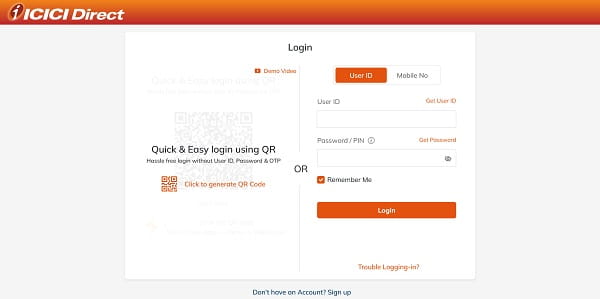
Understanding the Two Portals
ICICI Direct (icicidirect.com): The primary portal for all investment-related demat activities — viewing demat holdings, placing buy/sell orders, accessing contract notes, downloading P&L statements, managing demat account settings, and viewing transaction history. This is where the demat account’s trading interface lives.
iMobile Pay (ICICI Bank mobile app): The banking portal that handles the savings account side of the 3-in-1 account. From iMobile Pay, ICICI Bank customers can view their demat holdings summary, check account statements, access certain investment options, and initiate fund transfers between the savings and trading accounts. Direct trading execution happens on ICICI Direct, not on iMobile Pay.
Step-by-Step: ICICI Direct Login (Web)
Step 1. Go to icicidirect.com. Ensure you are on the official URL — bookmarking the page on first use prevents phishing risk from mistyped URLs.
Step 2. Click “Login” at the top right. Enter your ICICI Direct User ID — a unique identifier sent to your registered email at the time of account activation.
Step 3. Enter your password. ICICI Direct passwords are case-sensitive. Use the virtual keyboard option available on the login page if you prefer additional keylogger protection.
Step 4. Complete 2FA: An OTP is sent simultaneously to your registered mobile number and email. Enter it in the OTP field. This two-factor authentication is mandatory for every web login session as per SEBI’s exchange circular effective September 27, 2022.
Step 5. Upon successful 2FA, you enter the ICICI Direct dashboard. Navigate to the “Portfolio” section to view your demat holdings, “Funds” for trading account balance, and “Reports” for contract notes and tax statements.
Step-by-Step: ICICI Direct Login (Mobile App)
Download the ICICIDirect app from Google Play Store or Apple App Store. Launch the app and enter your User ID and password. Complete the 2FA OTP verification on first login. You can subsequently set a Quick PIN (4 or 6 digits) under Menu → My Profile → App Settings → Security Settings → Set Quick PIN for faster logins on the same device.
Step-by-Step: iMobile Pay Login (Demat Summary Access)
For ICICI Bank 3-in-1 account holders who want to check demat holdings from the banking app: open iMobile Pay, log in with your ICICI Bank customer ID and mPIN. Navigate to the “Investments” or “Accounts” section. A summary of your demat account holdings linked to your ICICI Bank savings account is visible. For detailed demat operations (trading, statements, full holdings view), you will be redirected to the ICICI Direct interface.
How to View Demat Holdings After Login
Once logged in to ICICI Direct: click on “My Portfolio” or navigate to the Portfolio section in the top menu. Your current demat holdings (equity shares, ETFs, bonds, government securities, and mutual funds in demat form) are displayed with current market value, quantity, average cost, and unrealised P&L. For a downloadable account statement: go to Reports → Account Statement, select the date range, and download the PDF.
How to Access Demat Account on ICICI Bank Net Banking
ICICI Bank net banking users (icicibank.com) can access certain demat account functions through the net banking portal under the Investments and Insurance → Demat section. From here, E-Instructions for transferring securities out of your demat account can be initiated — a useful feature for off-market transfers without calling the broker.
Overview: ICICI Demat Account Login — Quick Reference
| Access Route | Portal/App | Primary Use | Login Credentials |
| Investment Trading | icicidirect.com | Buy/sell, holdings, reports | ICICI Direct User ID + Password + OTP |
| Mobile Trading | ICICIDirect App | Same as web + Quick PIN | User ID + Password + OTP / Quick PIN |
| QR Code Web Login | Web (via App) | Fast web session from mobile | Scan QR using logged-in mobile app |
| Banking Summary | iMobile Pay | Holdings summary, fund view | ICICI Bank Customer ID + mPIN |
| Net Banking | icicibank.com | E-Instructions, demat summary | Net Banking Customer ID + Password + OTP |
Security Best Practices for ICICI Demat Login
Always use the official URLs (icicidirect.com, icicibank.com) and not links received via SMS or email. ICICI Direct and ICICI Bank will never ask for your password or OTP via phone, SMS, or email — never share these. Enable login notifications so you are alerted to every new session. If you notice an unrecognised login, immediately change your password and contact ICICI Direct customer care.
Frequently Asked Questions (FAQs)
Q1. What is the difference between logging in to ICICI Direct and iMobile Pay for demat access?
A: ICICI Direct (icicidirect.com) is the full investment trading and demat management platform. iMobile Pay shows a demat holdings summary for ICICI Bank 3-in-1 customers but directs to ICICI Direct for trading and detailed demat operations.
Q2. Where do I find my ICICI Direct User ID?
A: It was sent to your registered email on account activation. If forgotten, use the “Forgot User ID” option on icicidirect.com with your PAN and registered mobile to retrieve it.
Q3. Is 2FA mandatory for every ICICI Direct login?
A: Yes — an OTP to registered mobile and email is mandatory for every web login session, enforced since September 27, 2022 under SEBI’s exchange circular on 2FA.
Q4. Can I view my ICICI demat holdings on ICICI Bank net banking?
A: A summary is accessible via icicibank.com under Investments and Insurance → Demat. Full portfolio detail and trading is available on ICICI Direct.
Q5. How do I set Quick PIN for faster login on the ICICI Direct mobile app?
A: After a full credential login on the app, go to Menu → My Profile → App Settings → Security Settings → Set Quick PIN. Enter and confirm your preferred 4 or 6-digit PIN.